








Lenovo laptops with Intel Core Ultra 5 processors are popular in Nepal among students, office employees, business professionals, and content creators. These laptops offer a combination of reliable performance, power efficiency, modern graphics, and AI-powered features. Unlike traditional Intel Core i5 processors, newer Intel Core Ultra 5 processors include a Neural Processing Unit (NPU) in supported models. This dedicated hardware helps handle certain AI-related tasks efficiently without putting all the workload on the CPU or GPU.
Lenovo offers Intel Core Ultra 5 processors across its IdeaPad, Yoga, and ThinkPad laptop series. The IdeaPad series is suitable for students and everyday users, while the Yoga series offers flexible 2-in-1 designs. ThinkPad laptops focus on productivity, durability, and business requirements.
In this guide, we explore the latest Lenovo Intel Core Ultra 5 laptop prices in Nepal, compare their specifications, explain processor generations, and help you choose the right laptop according to your needs and budget.
What is an Intel Core Ultra 5 processor?
Intel Core Ultra 5 is a mid-range processor designed for modern laptops and desktop computers. It is part of Intel’s Core Ultra lineup that combines computing performance, integrated graphics, power efficiency, and AI acceleration. Depending on the generation and model, Intel Core Ultra 5 processors include performance-oriented CPU cores, integrated Intel graphics, and an NPU for supported AI tasks. The key features of Intel Core Ultra 5 processors include:
- Multitasking performance: Handles office applications, web browsing, programming, video calls, and everyday productivity.
- AI processing: Includes an NPU that accelerates compatible AI features and applications.
- Power efficiency: Designed to balance performance and battery consumption.
- Integrated graphics: Supports multimedia, high-resolution displays, and some creative applications without requiring a dedicated GPU.
- Modern connectivity: Laptop configurations may support Wi-Fi 6E, Wi-Fi 7, Thunderbolt, and USB-C connectivity.
Intel Core Ultra 5 laptops are ideal for users who want modern features and reliable performance without spending more on higher-end Core Ultra 7 laptops.
Latest Intel Core Ultra 5 Lenovo Laptop Prices in Nepal
The following table provides brief specifications about the latest Lenovo Intel Core Ultra 5 laptop available in Nepal.
| Lenovo laptop model | Processor | RAM / SSD | Display | Price in Nepal |
| IdeaPad Slim 5 (83S50066SK) | Intel Core Ultra 5 322 Processor | 16GB / 512GB | 14″ WUXGA (1920×1200) IPS 400 nits anti-glare, 100% sRGB, 120 Hz | Rs. 191,999 |
| IdeaPad Slim 5 2-in-1 (83UG000CSK) | Intel Core Ultra 5 322, 6 Cores | 16GB / 512GB | 14″ WUXGA (1920×1200) IPS 400-nit Glossy | Rs. 200,999 |
| ThinkPad E14 Gen 7 (21SXS0FA00) | Intel Core Ultra 5 225U | 16GB / 512GB | 14″ WUXGA (1920 x 1200), IPS, Anti-Glare, | Rs. 230,999 |
| Yoga 7 2-in-1 (83TC007TSK) | Intel Core Ultra 5 322, | 16GB / 512GB | 14″ WUXGA (1920×1200) OLED 400 nits, 100% DCI-P3, 100% sRGB | Rs. 232,999 |
| ThinkPad E16 Gen 3 (21SRS0LK00) | Ultra 5 225U | 16GB / 512GB | 16″ WUXGA (1920×1200) IPS 300-nits Antiglare | Rs. 235,999 |
| ThinkPad E14 Gen 7 (21SXS0F900) | Ultra 5 225H | 16GB / 512GB | 14″ WUXGA (1920 x 1200), IPS, Anti-Glare, 300 nits | Rs. 235,999 |
| ThinkPad L14 Gen 6 (21S7S1VG00) | Ultra 5 225H | 16GB / 512GB* | 14″ WUXGA (1920 x 1200), IPS, Anti-Glare, 400 nits | Rs. 256,999 |
Lenovo IdeaPad Slim 5
| Specifications | Details |
| Model | IdeaPad Slim 5 |
| Processor | Intel Core Ultra 5 322, 6 cores, 6 threads, up to 4.4 GHz |
| RAM | 16GB DDR5-5600 (2 × 8GB) |
| Storage | 512GB PCIe 4.0 NVMe SSD |
| Graphics | Integrated Intel Graphics |
| Display | 14-inch WUXGA IPS |
| AI processor | NPU, up to 46 TOPS |
| RAM upgrade | Two DDR5 SO-DIMM slots |

The Lenovo IdeaPad Slim 5 combines an Intel Core Ultra 5 322 processor with 16 GB RAM and fast SSD storage. With a sleek and slim design, the laptop is ideal for assignments, browsing, online classes, spreadsheets, presentations, and everyday multitasking. Its 14-inch screen makes it a practical choice for users who regularly carry their laptops between home, college, and the office. Lenovo IdeaPad Slim 5 also provides upgradibility option for users who want to upgrade their supported hardware to meet future computing needs.
Lenovo IdeaPad Slim 5 2-in-1
| Specifications | Details |
| Model | Lenovo IdeaPad Slim 5 2-in-1 |
| Processor | Intel Core Ultra 5 322, up to 4.4 GHz |
| RAM | 16GB DDR5-5600 (2 × 8GB) |
| Storage | 512GB NVMe SSD |
| Graphics | Integrated Intel Graphics |
| Display | 14-inch WUXGA IPS, 400 nits, touch |
| AI processor | NPU, up to 46 TOPS |
| RAM upgrade | Up to 32GB listed |
| Warranty | 1 year, courier or carry-in |

The Lenovo IdeaPad Slim 5 2-in-1 offers a flexible design with a 360-degree hinge, allowing users to switch between laptop and tablet-style use. Its touchscreen and Lenovo Pen Gen 2 support make it useful for handwritten notes, drawing, and presentations. It also offers two RAM slots and two M.2 SSD slots, providing more flexibility for future upgrades than many thin laptops. This model is a practical choice for students, teachers, and professionals who want a laptop that supports both typing and touch interaction.
Lenovo ThinkPad E14 Gen 7
| Specifications | Details |
| Model number | Lenovo ThinkPad E14 Gen 7 |
| Processor | Intel Core Ultra 5 225U, 12 cores, 14 threads |
| RAM | 16GB DDR5-5600 |
| Storage | 512GB PCIe Gen 4 SSD |
| Graphics | Intel Graphics |
| Display | 14-inch WUXGA |
| Operating system | Windows 11 Pro |
| Warranty | 3-year parts replacement; 1-year battery |

The Lenovo ThinkPad E14 Gen 7 is designed for professionals who need a reliable laptop for daily business operations. Its Intel Core Ultra 5 225U processor handles office software, accounting applications, web-based systems, video meetings, and multitasking.
The 14-inch display makes it convenient for travel and regular office use. Windows 11 Pro and the business-oriented ThinkPad design make it suitable for organizations and professionals looking for a productivity-focused laptop.
Lenovo Yoga 7 2-in-1
| Specifications | Details |
| Model number | Lenovo Yoga 7 2-in-1 |
| Processor | Intel Core Ultra 5 322, up to 4.4 GHz |
| RAM | 16GB LPDDR5X-7467 |
| Storage | 512GB PCIe 4.0 NVMe SSD |
| Graphics | Integrated Intel Graphics |
| Display | 14-inch WUXGA OLED touch, 400 nits, 60Hz |
| Color coverage | 100% DCI-P3 |
| AI processor | NPU, up to 46 TOPS |
| Battery | 70 Wh |
| Warranty | 1 year, courier or carry-in |
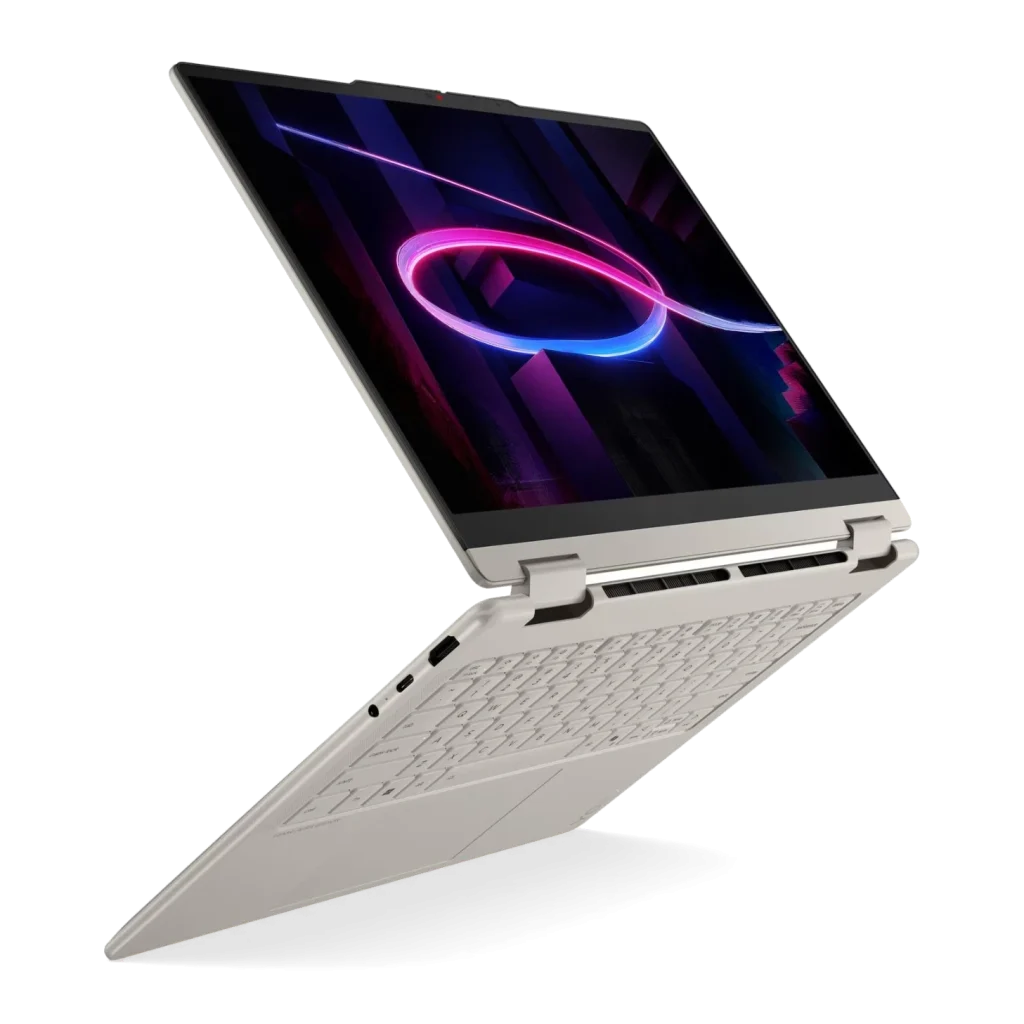
The Lenovo Yoga 7 2-in-1 stands out with its OLED touchscreen, which delivers deep blacks, strong contrast, and vibrant colors. Its 360-degree convertible design allows users to work in laptop, tablet, tent, or stand mode. The 70Wh battery and Dolby Atmos-optimized speakers make it appealing for entertainment, presentations, and everyday productivity. It also supports the Lenovo Yoga Pen Gen 2. However, the 16GB RAM is soldered and cannot be upgraded, so buyers should consider their long-term memory requirements.
Lenovo ThinkPad E16 Gen 3
| Specifications | Details |
| Model number | Lenovo ThinkPad E16 Gen 3 |
| Processor | Intel Core Ultra 5 225U, 12 cores, 14 threads |
| RAM | 16GB DDR5-5600 |
| Storage | 512GB M.2 SSD |
| Graphics | Intel Graphics |
| Display | 16-inch WUXGA |
| Operating system | Windows 11 Pro |
| Warranty | 3-year parts replacement; 1-year battery |

The Lenovo ThinkPad E16 Gen 3 is suitable for accountants, office employees, business owners, and professionals who work with large spreadsheets and multiple windows. Its 16-inch WUXGA display provides more screen space than 14-inch laptops, making document editing and multitasking more comfortable. The Core Ultra 5 225U processor focuses on efficient productivity, while Windows 11 Pro provides features useful in business environments.
Lenovo ThinkPad E14 Gen 7
| Specifications | Details |
| Model number | Lenovo ThinkPad E14 Gen 7 |
| Processor | Intel Core Ultra 5 225H |
| RAM | 16GB DDR5-5600 |
| Storage | 512GB SSD |
| Graphics | Intel Arc |
| Display | 14-inch WUXGA |
| Operating system | Windows 11 Pro |
| Warranty | 3-year parts replacement; 1-year battery |

The Lenovo ThinkPad E14 Gen 7 with the Core Ultra 5 225H is aimed at users who need more processing power for demanding multitasking, programming, business applications, and productivity software. Compared with the 225U variant, the 225H generally offers stronger performance for sustained CPU-intensive tasks, although actual results depend on the laptop’s cooling and power settings.
Lenovo ThinkPad L14 Gen6
| Specifications | Details |
| Model number | Lenovo ThinkPad L14 Gen6 |
| Processor | Intel Core Ultra 5 225H |
| RAM | 16GB DDR5-5600 |
| Storage | 512 GB M.2 2242 SSD |
| Graphics | Intel Arc 130T |
| Display | 14-inch WUXGA IPS, 400 nits, anti-glare |
| AI processor | Intel AI Boost, up to 13 TOPS |
| Warranty | 3-year parts replacement; 1-year battery |

The Lenovo ThinkPad L14 Gen 6 is built for professionals and organizations that need dependable performance, practical connectivity, and business security features. Its Intel Core Ultra 5 225H processor and Intel Arc 130T graphics support demanding office applications and some creative workloads. The laptop also includes a fingerprint reader, camera privacy shutter, spill-resistant keyboard, and MIL-STD-810H testing, which ensure security and durability. The 14-inch anti-glare display and 1.38 kg weight make it convenient for office work and business travel.
Intel Core Ultra 5 generations and model suffixes explained
Intel Core Ultra processors are available in different generations, each introducing changes in processing performance, graphics, power efficiency, and AI capabilities. Understanding the generation and model number helps you choose a laptop that meets your requirements.
Intel Core Ultra generations:
| Processor generation | Example | Main characteristics |
| Core Ultra Series 1 | Ultra 5 125H | Early Core Ultra architecture with integrated NPU |
| Core Ultra Series 2 | Ultra 5 225U, 225H | Updated processors with different performance and efficiency options |
| Core Ultra Series 3 | Ultra 5 322 | Newer architecture, improved AI capabilities in supported models |
It is important to note that newer generations do not always provide faster performance, as the Core Ultra 5 225 H may perform better than the Core Ultra 5 322 in certain tasks, as they have different configurations and power limits.
What do U, H, and V suffixes mean?
| Processor suffix | Meaning | Suitable for |
| U | Power-efficient mobile processor | Office work, study, everyday productivity |
| H | Higher-performance mobile processor | Programming, demanding multitasking, creative workloads |
| V | Efficiency-focused processor family with advanced integrated graphics and AI features in supported generations | Thin premium laptops, AI applications, portable productivity |
The suffix is useful for understanding the processor’s intended purpose, but it does not determine the laptop’s overall performance by itself. Cooling, memory, graphics, and processor generation also matter.
Best Lenovo Core Ultra 5 models for students, office users, and businesses
The best Lenovo Core Ultra 5 laptop depends on how you plan to use it. Students may prefer portability and touchscreen features, while business professionals may prioritize security, connectivity, and warranty coverage.
| User category | Recommended Lenovo laptop | Why choose it? |
| College students | IdeaPad Slim 5 | Portable, good display, everyday performance |
| Students who take handwritten notes | IdeaPad Slim 5 2-in-1 | Touchscreen, convertible design, pen support |
| Teachers and presenters | Yoga 7 2-in-1 | OLED touchscreen, flexible viewing positions |
| Office employees | ThinkPad E14 Gen 7 (225U) | Compact business design and Windows 11 Pro |
| Accountants and finance professionals | ThinkPad E16 Gen 3 | Larger 16-inch screen for spreadsheets |
| Programmers and demanding multitaskers | ThinkPad E14 Gen 7 (225H) | Higher-performance processor |
| Business owners and corporate professionals | ThinkPad L14 Gen 6 | Business security, connectivity, and extended warranty |
For most students, the IdeaPad Slim 5 offers a good balance between price, performance, and display quality. Users who regularly write notes or make presentations may find the IdeaPad Slim 5 2-in-1 more useful.
For office and business environments, the ThinkPad E14 and E16 series are practical choices. The ThinkPad L14 Gen 6 is worth considering for organizations that require business-focused features and support.
ThinkPad E14 vs L14 vs T14: Which is better?
| Features | ThinkPad E14 | ThinkPad L14 | ThinkPad T14 |
| Series category | Entry-level business | Mainstream business | Premium business |
| Target users | Small businesses, office employees | Corporate employees, organizations | Executives, frequent travelers, enterprise users |
| Display size | 14 inches | 14 inches | 14 inches |
| Processor options | Core Ultra 5 and Ultra 7, depending on generation | Core Ultra 5 and Ultra 7, depending on generation | Core Ultra 5 and Ultra 7, depending on generation |
| Build quality | Business-oriented construction | Corporate-oriented construction | More premium configurations available |
| Portability | Good | Good | Often optimized for portability |
| Security | TPM, fingerprint, and other options depending on configuration | Business security features | Advanced enterprise security options depending on configuration |
| RAM upgrade | Depends upon configuration | Depends upon configuration | Configuration-dependent |
| Connectivity | USB-C, USB-A, and HDMI; exact ports vary. | Business connectivity, including Ethernet on the listed L14 | Business connectivity: exact ports vary depending upon the model. |
| Main advantage | Business features at a lower series tier | Balance of business features and manageability | Premium business design and enterprise options |
So which model is best for you? The ThinkPad E14 is suitable for small business owners, students, and office employees who want a dependable business laptop without paying extra for higher-tier enterprise features. Similarly, the ThinkPad L14 is suitable for companies and professionals who need practical business connectivity, security, and service options. Meanwhile, the ThinkPad T14 is generally positioned above the E and L series and is worth considering for frequent travelers, executives, and corporate users who prioritize premium business features.
When choosing a laptop, we recommend getting a laptop following a detailed comparison and expert consultation to choose the best model based on your computing requirements.
Core Ultra 5 vs. Core i5 vs. Core Ultra 7
Intel Core i5, Core Ultra 5, and Core Ultra 7 are designed for different processor generations and performance categories. Traditional Core i5 laptops remain useful for everyday computing, while Core Ultra processors introduce newer architectures and dedicated AI hardware in supported models.
| Features | Intel Core i5 | Intel Core Ultra 5 | Intel Core Ultra 7 |
| Processor category | Mainstream, older Core branding | Modern mid-range Core Ultra | Higher-tier Core Ultra |
| Performance | Depends on generation and model | Balanced everyday and professional performance | Generally higher performance within comparable generations |
| AI/NPU | Usually no dedicated NPU in traditional Core i5 models | Dedicated NPU | Dedicated NPU |
| Integrated graphics | Intel UHD or Iris Xe, depending on the model | Intel Graphics or Arc, depending on model | Intel Graphics or Arc, depending on model |
| Power efficiency | Generation-dependent | Modern efficiency-focused designs | Depends on processor model and laptop configuration |
| Office productivity | Very good | Very good | Excellent |
| Programming | Suitable for many tasks | Suitable for most development work | Better suited to more demanding workloads in comparable configurations |
| Video editing | Depends on GPU and processor | Suitable for light to moderate editing | Often better for heavier editing |
| Gaming | Depends on GPU | Depends on GPU | Depends on GPU |
| Price category | Often more affordable in older laptops | Mid-range to premium | Usually more expensive |
| Best for | Budget-conscious everyday users | Students, professionals, business users | Power users and demanding multitaskers |
A newer Core Ultra 5 is not automatically faster than every Core i5 or Core Ultra 7. For
For example, a high-performance H-series processor may outperform a newer low-power model in demanding workloads. For everyday tasks such as Microsoft Office, browsing, video meetings, and assignments, a Core Ultra 5 is usually sufficient. Users who frequently perform demanding software development, video editing, or other CPU-intensive work may benefit from a suitable Core Ultra 7 configuration.
AI/NPU capabilities: What do they actually do?
One of the main features of Intel Core Ultra processors is the Neural Processing Unit (NPU).
An NPU is a dedicated processor designed to handle supported artificial intelligence tasks efficiently. Instead of relying entirely on the CPU or GPU, compatible software can use the NPU for certain AI operations.
Function of CPU, GPU, and NPU
| Component | Main function | Examples |
| CPU | General computing and application processing | Browsing, Excel, coding, multitasking, running operation systems |
| GPU | Graphics and parallel processing | Video rendering, image processing, graphics, 3D modeling, high-end gaming |
| NPU | Efficient AI acceleration and machine learning | Live background blur, real-time speech-to-text, local AI image generation |
RAM, SSD, Screen, Battery, and Upgradeability Comparison
Processor performance is important, but RAM, SSD storage, screen quality, battery capacity, and upgradeability also affect the laptop’s everyday usability. With rising computing needs, laptops with upgradeability support like RAM, SSD, or any other component make it ideal to meet the changing demand of users.
The following comparison highlights the key hardware differences among the listed Lenovo Core Ultra 5 models.
| Laptop model | RAM | SSD | Display | Battery | Upgradeability |
| IdeaPad Slim 5 | 16GB DDR5 | 512GB | 14″ IPS, 120Hz, 100% sRGB | 60 Wh | Two RAM slots, two SSD slots |
| IdeaPad Slim 5 2-in-1 | 16GB DDR5 | 512GB | 14″ IPS Touch, 60Hz | 60 Wh | Two RAM slots, two SSD slots |
| ThinkPad E14 Gen 7 (225U) | 16GB DDR5 | 512GB | 14″ WUXGA | Confirm exact configuration. | Configuration-dependent |
| Yoga 7 2-in-1 | 16GB LPDDR5X | 512GB | 14″ OLED Touch, 60 Hz | 70 Wh | RAM soldered, SSD replaceable |
| ThinkPad E16 Gen 3 | 16GB DDR5 | 512GB | 16″ WUXGA | Confirm exact configuration. | Configuration-dependent |
| ThinkPad E14 Gen 7 (225H) | 16GB DDR5 | 512GB | 14″ WUXGA | Confirm exact configuration. | Configuration-dependent |
| ThinkPad L14 Gen 6 | 16GB DDR5 | 512GB | 14″ IPS, 400 nits | 57 Wh | Confirm supported upgrades. |
Warranty, authenticity, and purchasing guidance
When purchasing an Intel Core Ultra 5 Lenovo laptop in Nepal, it is important to check more than the processor and price. Warranty coverage, product authenticity, included software, and after-sales support can affect your long-term experience.
Before purchasing, check the following:
- Confirm the exact model number: Match the laptop’s machine type or SKU with the product listing to avoid confusion between configurations.
- Verify the warranty: Check the duration, battery coverage, service type, and applicable warranty conditions.
- Check product authenticity: Verify the laptop’s serial number through Lenovo’s official warranty lookup service.
- Review the complete specifications: Confirm RAM, SSD capacity, processor, display, and operating system before payment.
- Ask about upgrades: Confirm whether upgrading RAM or storage is supported and whether installation affects warranty coverage.
- Request a VAT bill: Keep your purchase invoice and warranty documents for future reference.
If you are planning to purchase a Lenovo Intel Core Ultra 5 laptop in Nepal, contact Megatech Group (MGPL). Megatech Group (MGPL) offers genuine Lenovo laptops with full product warranty, genuine software, and after-sales support and guidance in choosing the best laptop as per your computing needs and requirements.
Frequently Asked Questions
1. What is the price of an Intel Core Ultra 5 Lenovo laptop in Nepal?
The price of an Intel Core Ultra 5 Lenovo laptop in Nepal varies according to its model and specifications. Genuine and authorized distributors like Megatech Group (MGPL) provide various Lenovo Core Ultra 5 series from NPR 191,999 to NPR 256,999 and above depending upon specification. You also get a full product warranty, reliable after-sales support, and assistance in choosing the ideal laptop according to use.
2. Is Intel Core Ultra 5 better than Intel Core i5?
The performance depends on the specific processor generation, power limits, and laptop configuration. Intel Core Ultra 5 processors offer newer architectures and dedicated AI processing in supported models, but the device may not necessarily be faster than every Core i5. Traditional core i5 processors can still outperform newer Intel Core Ultra 5 models in raw single-core performance and when paired with high-end dedicated graphics cards.
3. Is Intel Core Ultra 5 good for students?
Intel Core Ultra 5 laptops are suitable for students, as they are reliable for research, assignments, online classes, presentations, programming, and everyday multitasking.
4. Can Intel Core Ultra 5 laptops handle programming?
Intel Core Ultra 5 laptops can handle common programming tasks, including web development, Python, Java, and many software development applications. For larger projects, virtual machines, or heavy development tools, consider a higher-performance processor and additional RAM.
5. Which Lenovo Core Ultra 5 laptop is best for office work?
The Lenovo ThinkPad E14 Gen 7 with Core Ultra 5 225U is a practical option for office work. It offers a lightweight design, durable build quality, and reliable performance for daily multitasking and AI-driven office workflows. Users who frequently work with large spreadsheets may prefer the ThinkPad E16 Gen 3 because of its larger 16-inch display, providing convenience.